
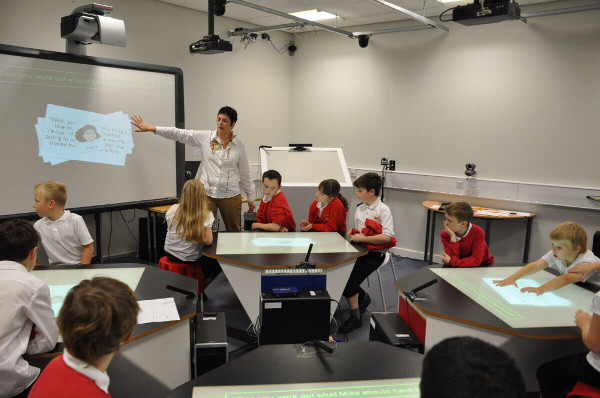
In recent years, digital classroom tools have revolutionized the way educators teach and students learn. From elementary schools to universities and professional training programs, educational institutions are integrating digital platforms to enhance instruction, improve student engagement, and streamline administrative workflows. This blog explores the most impactful digital classroom tools, their benefits, challenges, and best practices for implementation.
What Are Digital Classroom Tools?
Digital classroom tools are software platforms and applications designed to support teaching and learning activities. These tools enable communication, collaboration, content delivery, assessment, and classroom management in an online or blended learning environment.
At their core, digital tools help educators:
- Deliver content more effectively
- Track student progress accurately
- Facilitate real‑time communication
- Personalize learning experiences
- Integrate multimedia resources
As education shifts toward technology‑rich learning environments, understanding and using digital classroom tools has become a necessity for educators and institutions.
Popular Digital Classroom Tools and Platforms
Here are some of the most widely used digital classroom tools that educators and students rely on today.
1. Google Classroom
Google Classroom is a free learning management system (LMS) from Google that helps teachers create, distribute, and grade assignments digitally. It integrates seamlessly with other Google Workspace tools like Google Docs, Google Sheets, and Google Drive, allowing educators to organize resources, share materials, and provide feedback efficiently.
Key features:
- Assignment creation and submission tracking
- Real‑time collaboration on documents
- Integration with third‑party educational apps
- Simplified communication between teachers and students
Google Classroom supports a paper‑less classroom model and reduces administrative burden, making it ideal for K‑12 and higher education settings.
2. Zoom
Zoom has become synonymous with online classes and virtual meetings. Its video conferencing capabilities allow teachers to host live lessons, break students into smaller groups, and record sessions for later review.
Important features:
- High‑quality video and audio conferencing
- Screen sharing and annotation tools
- Virtual breakout rooms
- Session recording and transcription
Zoom supports synchronous learning and helps maintain classroom continuity when in‑person interaction is not possible.
3. Microsoft Teams
Microsoft Teams is an all‑in‑one digital hub that combines chat, video meetings, file storage, and app integration. It is particularly useful for schools that use Microsoft 365 tools like Word and OneNote.
Benefits of Teams:
- Centralized communication and collaboration
- Integrated assignments and grades
- Supports third‑party educational apps
- Works across devices
Microsoft Teams excels in facilitating project‑based learning and hybrid education models.
4. Kahoot!
Kahoot! is a game‑based learning platform that makes classroom activities fun and interactive. Teachers can design quizzes, flashcards, and polls to reinforce learning and assess student understanding in real‑time.
Features that boost engagement:
- Competitive learning games
- Instant feedback and scoring
- Templates for various subjects
- Integration with LMS platforms
Kahoot! motivates students through gamification and supports formative assessment strategies.
5. Nearpod
Nearpod allows teachers to create interactive lessons that include quizzes, polls, videos, and virtual reality experiences. It helps bridge the gap between teaching content and engaging students.
Top features:
- Student pacing and participation tracking
- Virtual field trips through VR
- Cross‑platform accessibility
- Integration with Google Classroom and Microsoft Teams
Nearpod transforms traditional lessons into dynamic learning experiences.
6. Quizlet
Quizlet is a study tool that allows students to create digital flashcards and practice exercises. It supports self‑paced learning and helps students review material outside class.
Popular functionalities:
- Custom flashcard decks
- Learning games and tests
- Collaboration with classmates
- Mobile app for learning on‑the‑go
Quizlet encourages repetitive practice and improves memory retention.
7. Edmodo
Edmodo is a social learning platform that connects teachers, students, and parents. It blends classroom communication with lessons and assessment tools.
Notable features:
- Class announcements and discussions
- Assignment management
- Parent engagement tools
- Secure and student‑friendly interface
Edmodo resembles a social network designed for education, promoting communication and visibility.
Benefits of Using Digital Classroom Tools
Integrating digital tools into education provides numerous advantages:
Improved Student Engagement
Digital tools like Nearpod and Kahoot! transform passive learning into active participation. By incorporating interactive media and gamification, educators capture students’ attention and make learning memorable.
Personalized Learning Paths
Tools such as Quizlet and adaptive learning platforms allow students to learn at their own pace. This is particularly beneficial for diverse classrooms where learners have different abilities and learning styles.
Efficient Assessment and Feedback
Digital platforms provide instant feedback on quizzes and assignments. Teachers can quickly identify learning gaps and intervene promptly. Systems like Google Classroom enable automatic grading for certain assignment types.
Enhanced Collaboration
Platforms such as Microsoft Teams and Google Classroom make it easy for students to work together on projects, share resources, and communicate effectively. Peer‑to‑peer learning becomes natural and efficient.
Flexibility and Accessibility
Students can access learning materials anytime, anywhere. This flexibility supports remote learners and students with varying schedules. Cloud‑based platforms also ensure that resources are stored securely and available across devices.
Streamlined Classroom Management
Digital tools automate tasks like attendance, grading, and assignment distribution, freeing teachers to focus on instruction and student engagement. Tools with dashboards simplify progress monitoring and reporting.
Challenges and Considerations
While digital classroom tools offer significant benefits, educators and institutions must navigate challenges:
Digital Divide and Accessibility
Not all students have equal access to devices or reliable internet. Schools must plan to provide necessary technology and support to avoid widening achievement gaps.
Teacher Training and Preparedness
Effective integration of technology requires training. Educators must be confident using tools and designing lessons that leverage digital capabilities.
Data Privacy and Security
Storing student data on platforms raises concerns over privacy and compliance with regulations like FERPA (Family Educational Rights and Privacy Act). Schools must choose tools that prioritize secure data practices.
Overreliance on Technology
Technology should enhance — not replace — pedagogy. Educators must balance digital tools with meaningful teacher‑led instruction.
Best Practices for Implementing Digital Classroom Tools
For successful digital transformation in education, follow these best practices:
Conduct Needs Assessment
Understand the goals of your institution and the needs of your students before selecting tools. An assessment helps ensure technology aligns with curriculum objectives.
Provide Professional Development
Train educators on how to use platforms effectively. Offer ongoing workshops, peer support groups, and resources to build confidence.
Choose Scalable and Interoperable Platforms
Ensure the tools you select integrate with existing systems (e.g., LMS, gradebooks). Platforms that communicate with other software create a seamless workflow.
Focus on Student Engagement
Select tools that promote interaction, collaboration, and creative expression. Engagement should be a key criterion in your decision‑making process.
Monitor and Evaluate Outcomes
Regularly assess the impact of digital tools on learning outcomes. Gather feedback from teachers, students, and parents to refine your strategy.
Future Trends in Digital Classroom Tools
Education technology is constantly evolving. Some trends to watch include:
Artificial Intelligence in Education
AI can personalize learning content and automate administrative tasks. Tools powered by AI may provide deeper insights into student learning patterns.
Augmented and Virtual Reality
AR and VR tools can offer immersive educational experiences, making abstract concepts tangible and engaging.
Learning Analytics
Data analytics will help educators make informed decisions and design interventions tailored to learner needs.
Mobile‑First Learning
As mobile device usage increases, tools optimized for smartphones and tablets will expand access to education.
Conclusion
Digital classroom tools are reshaping the educational landscape. Platforms like Google Classroom, Zoom, Microsoft Teams, Kahoot!, and Nearpod provide powerful ways to enhance teaching and learning. By choosing the right technology, supporting teachers, and prioritizing student engagement, institutions can create a dynamic and inclusive learning environment.
Whether you are an educator looking to innovate in the classroom or an administrator planning a digital strategy, adopting robust digital classroom tools will be key to future‑ready education.